|
"New FREE Touch Screen Upgrade with 3D Customer Interface"
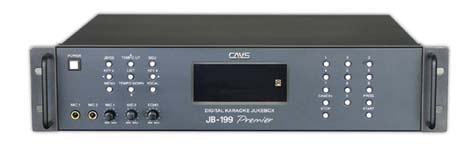
CAVS JB-199 II Premier Digital Jukebox
is a dual screen karaoke player that displays independently the
control panel and the sing-along lyrics. The control
panel, separated from the lyric screen, gives at all times
the full access to the enhanced karaoke functions such as
using multiple song lists, shuffling reserved songs,
real-time song search, drag & drop play, instant replay with
variable position, etc. CAVS JB-199 II Premier
enjoys faster speed and greater flexibility from a regular
CAVS JB-199 II for
more demanding environments. Its proven track record has won
countless praises for its functionality and reliability.
CAVS JB-199 II Premier Digital Jukebox,
like a regular CAVS JB-199 II, harnesses the digital technology of storing over 100,000
songs that are accessible with simple push of buttons. Its open architecture supports
CD+G, Super CD+G, MP3+G, MCG, NCG, AVI, and WMV song files, which can be imported from
both discs and hard drives.
CAVS JB-199 II Premier is backward compatible
to import the songs of JB-99, JB-199, and JB-199 II players. It can also record as well as
write in real-time your karaoke sing along onto blank discs.
CAVS JB-199 II
Premier Digital Jukebox has recently added a new networking feature with
E-Songbook
that replaces the paper songbooks and remote controls at the same time. Imagine
"No More Printing Paper Songbooks" and "No More Appending
Pages".
E-Songbook
is a Android Touch Screen tablet that
automatically imports the song list from CAVS JB-199 II
Premier using Wi-Fi, and enables Search, Select, and Play of the songs
from its touch screen. For details, go to
E-Songbook.
For those who have smart phones or tablets, such as iPhone,
iPad, or Android, you can also
download free Apps and connect to JB-199. You can Search, Save and
Reserve the songs in
JB-199 directly from your devices. For details, go to
CAVS Reservation System.
CAVS JB-199 II
Premier Digital Jukebox supports Touch Screen
monitor with 3D Customer Interface. The 3D Customer
Interface provides easy access for the Host as well as
Customers to all songs. You can
scroll, sort, and search instantly without the paper song
books.
For detail instruction on how to install and operate, please
go to
Touch Screen/3D Customer Interface. Do you need more than one touch screen to
provide multiple access points for your customers? Please
remember that for all JB-199 players, you can also use the wireless
E-Songbooks,
iPhones, iPads, and
Android devices to see the songs and reserve paperlessly.
CAVS JB-199 II Premier Digital Jukebox
comes with an option to encrypt the song content inside the
player such that no other player and no other computer can
use the data.
Such protection is possible by attaching hardware
specific data onto each song files. The protection
requires a USB key lock that can be purchased directly from
sales@cavsusa.net.
CAVS JB-199
has many song packages to start you off immediately for your
karaoke show. The song packages from CAVS,
Chartbuster, Disney, and Stellar Records contain up to 6,000 songs
of Pop, Rock, Country, Blue, etc., at bargain prices.
Visit
Song
Packages for details.
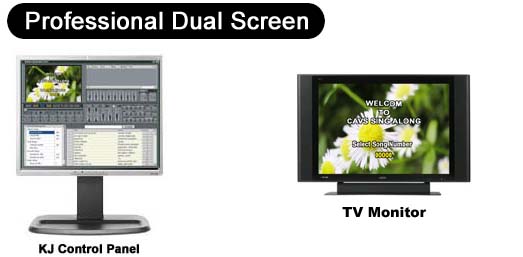

The KJ Control Panel*
provides real-time access to multiple song lists, song search,
reserved songs, pitch & tempo controls, volume control,
continuous/single, equalizer controls, repeats, background
video, etc. Viewed in a separate screen, it provides
independent access and total freedom from the TV monitor showing
lyrics for the customers.
*Monitors not included.
FEATURES
- Dual screen mode with independent KJ Control Panel and Lyric display.
- Play CD+G, Super CD+G, MP3+G, MCG, NCG, AVI, WMV, MIDI, and CD song files from internal hard drive
- Play CD+G, Super CD+G, MIDI, and CD discs*
- Store 100,000 songs or more
- Capture CD+G, Super CD+G, AVI. WMV, and CD songs from discs*
- Record and write onto blank disc*
- Song search by title, artist, or index
- Remote access and management via network/Internet
- Key control, Tempo control, Sync control, Volume control
- Voice cancel, Repeat, Random, Fanfare, Score
- Reservation, Random play, Repeat play
- Change reservation order
- Call next in reservation
- Silence gap remover
- Continuous/Single play
- A-B loop, Location (6) finder, Fast forward, Fast backward
- 8-Segment Equalizer with 6 pre-settings
- Easy song updates, program upgrades, and song list management
- Superimpose background video (BGV) from internal video files, still images, webcam, external video
sources**
- Connect to iPhone, iPad, Android, and
E-Songbook (See
CAVS RS II Server program)
- 3D Customer Interface with Touch Screen
support
- Encryption of song content for protection
against copying / exporting.
* Requires optional disc drive.
** Requires optional USB camera / RCA to USB Video cable.
KEYBOARD SHORTCUT
USER'S MANUAL
CAVS JB-199 II PREMIER and DUAL SCREEN PROGRAM UPGRADE
New Release (Includes
3D Customer Interface and Touch Screen support. Requires
installation of MS DirectX)
Package |
File size |
Version |
Date |
Download link |
How to Upgrade |
| Full Upgrade Version (.zip) |
38.8MB |
2.1.154.0 |
Oct 2012 |
Download |
Read Me |
| Microsoft DirectX (.zip) |
106.0MB |
|
Feb 2010 |
Download |
Read me |
Previous Version
Package |
File size |
Version |
Date |
Download link |
How to Upgrade |
| Full Upgrade Version (.zip) |
38.8MB |
2.1.144.0 |
Oct 2012 |
Download |
Read Me |
Note: This upgrade is for
JB-199 II Premier or Dual Screen JB-199 II player.
For
Single Screen JB-199 II player, go to
JB-199 II homepage.
CAVS JB-199 MANAGER PROGRAM
DOWNLOAD MCG MANAGER
INSTRUCTION ON DOWNLOADING SONGS FROM CAVS WEBSITE
|
 |
|
In order to read PDF file, you must have Adobe Acrobat Reader installed in your PC.
Download the latest Acrobat Reader for free from Adobe's website.
|
HOW TO INSTRUCTIONS
INCLUDED ACCESSORIES
- User's Manual
- Remote Controller
- High Quality Gold Plated AV Cable
- Handle Bracket
- Ethernet (LAN) Cable
- System and Driver CDs
OPTIONAL ACCESSORIES
FREQUENTLY ASKED QUESTiONS
|